Business Central for wholesale distributors
Accurate stock, faster purchasing and a warehouse that ships the right order the first time.
Where distributors lose time and margin
- Inventory you can’t trust. System counts drift from what’s on the shelf.
- Manual purchasing. Buyers reorder from memory or spreadsheets.
- Picking errors. Wrong items or quantities shipped, and costly returns.
- Hidden costs. Freight and duty aren’t added to item costs, so margins look better than they are.
Built around the order-to-cash and procure-to-pay flow
Multi-location inventory
Stock by location and bin, transfers, cycle counts and item tracking.
Purchasing & replenishment
Reorder points, planning suggestions and vendor lead times turned into purchase orders.
Warehouse processes
Receiving, put-away, picking and shipping documents by bin.
Shipping
Shipment documents, carrier integrations and tracking.
Landed cost
Freight, duty and handling charged to the items they belong to.
Margin reporting
Profit by item, customer and salesperson on live data.
A typical order, start to finish
Order
Sales order entered with live stock and pricing.
Release
Order released to the warehouse.
Pick
Pick list created by bin and handled.
Ship
Shipment posted, stock reduced.
Invoice
Invoice posted, ledger updated.
Is Business Central enough for your warehouse?
Business Central
Standard inventory and warehouse processes: receiving, put-away, picking, shipping and bin-level stock for small and midsize operations.
Business Central plus a warehouse extension
Barcode scanning, handheld devices or more advanced picking, added through a specialist app from Microsoft AppSource.
Dynamics 365 Supply Chain Management
High-volume or multi-site warehousing, advanced wave picking, transportation management and complex supply chains.
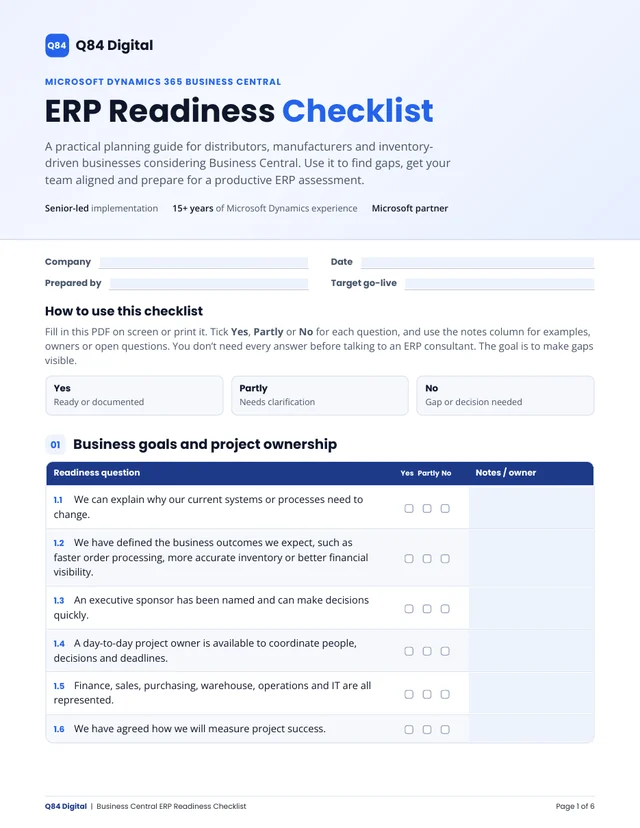
Is your business ready for a new ERP?
Our free ERP Readiness Checklist covers 52 questions across 9 areas, from inventory and warehouse to data and budget. Fill it in with your team, then bring it to your assessment.
Fillable PDF, 6 pages. No email required.
Talk to a distribution ERP specialist
Pick a time for your free 30-minute ERP assessment with the consultant who would deliver your project.